

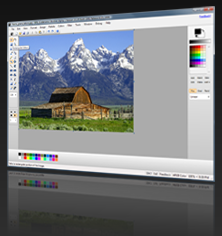
Familiar user interface
The user interface of NPS is loosely based on that of Microsoft Paint, though with many enhancements. Some items – such as the color picker on the bottom – directly resemble their Microsoft Paint counterparts, while others are entirely new.
Advanced color picker
NPS includes no less than 17 color selectors, each with a different scenario in mind. Use intuitive pickers like RGB and HSL, or advanced pickers like Lab or YUV. And are you designing for the web? You can copy/paste color expressions, search named web colors, and restrict the color picker to web-safe or palette-limited colors.
Customizability and adaptability
Everybody is different. That's why NPS allows you to customize many things – from color scheme to scroll wheel behavior. Multi-user environment? No problem – NPS can be customized on a per-user basis, and you can even configure it for a domain environment.
Image filters and effects
NPS comes with many image filters out of the box, including several blurs, brightness, emboss, sharpen, matrix transformation, and more. This version of NPS is compatible with existing NPS 2.x filters. Additionally, you can create your own filters using nearly any programming language.
Made for Windows 98 and XP
Using as little as 10MB of hard disk space, NPS is perfect for light image editing, and for use on not-so-powerful computers. Requires .NET Framework 2.0 and runs on Windows 98, 2000, XP, Vista, 7, and 8. Enjoy classic image editing in between retro gaming sessions, or keep an old computer useful for longer.
And More...
NPS has many more features, including enhanced printing capabilities, a batch image converter, and an intuitive configuration panel. So what are you waiting for? Download a copy now!